

Most bots and apps start small: one process, one file of data, one deployment. Then the bot reaches a few thousand servers, the API gets a queue of slow jobs, the dashboard gets real traffic, and one process stops being enough. Making it bigger only works for a while. Past a point, you split it.
This guide shows how to split a large app into pieces that each do one job, using a Discord bot as the main example and APIs, websites and workers alongside it. It also states plainly what Bot-Hosting runs at that scale, so you can decide before you migrate.
The setup in three steps
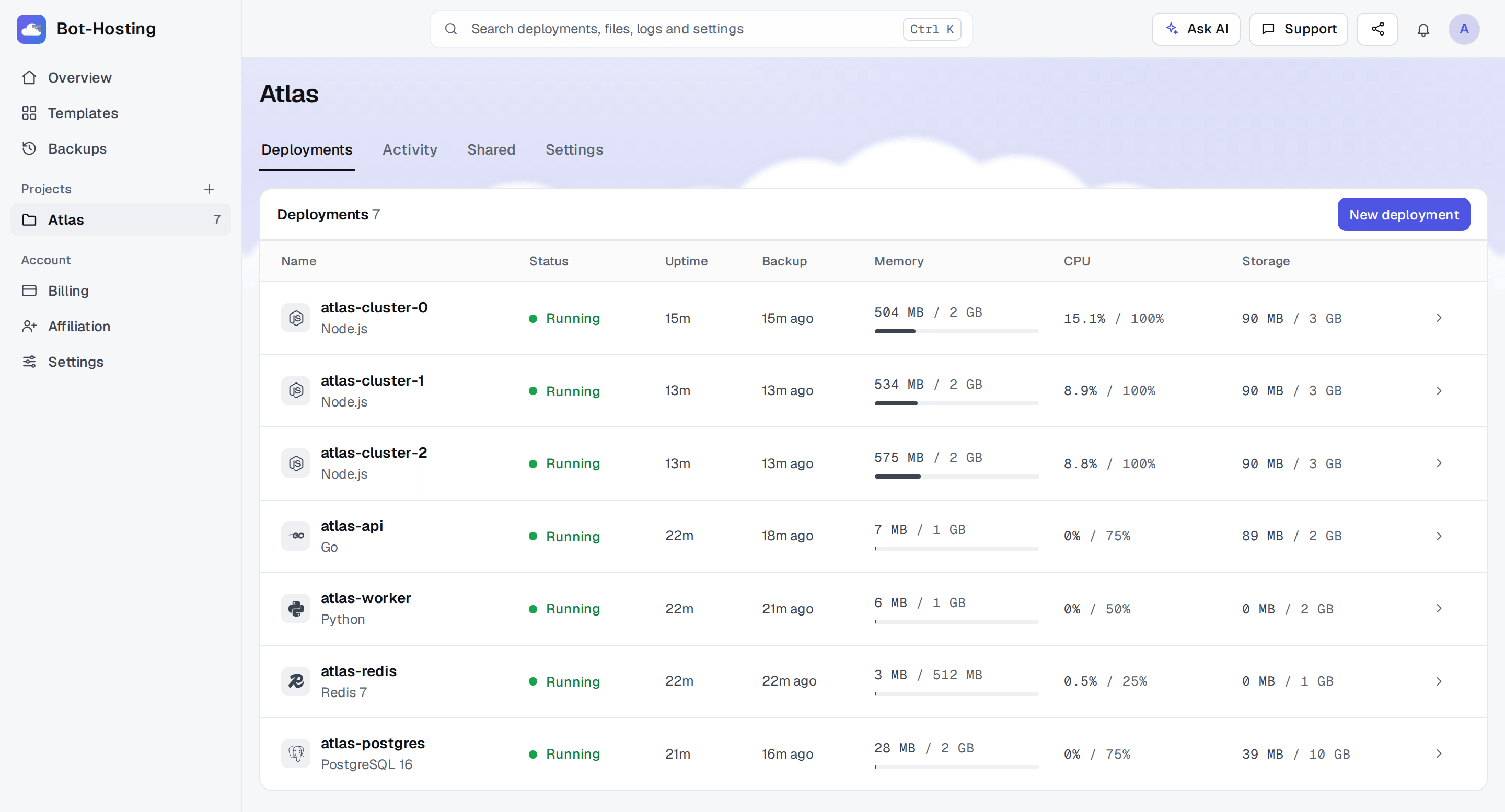
- Split the app into deployments in one project. For example: three bot clusters (
atlas-cluster-0toatlas-cluster-2), an API, a queue worker, a Redis and a PostgreSQL. Every piece is its own container with its own limits and its own console. - Give each piece its share of the pool. Paid plans come with a pool of RAM, CPU and storage that you split between deployments. Enterprise has 20 GB and 6 cores; the Custom plan goes up to 64 GB and 32 cores.
- Wire them with environment variables. Copy the connection strings from the Database tab of the Redis and PostgreSQL deployments into
REDIS_URLandDATABASE_URL, marked Secret, on every deployment that needs them. Deploy the same Git repository to each bot cluster and tell them apart with a variable such asBOT_FIRST_CLUSTER.
The rest of this post explains how to cut a Discord bot into clusters without upsetting Discord’s rate limits, where state should live, and how to scale APIs and workers.
What Bot-Hosting runs at this scale
Figures from production on 9 November 2026: the largest project holds 53 Node.js deployments sharing 27 GB of RAM and 10.6 cores, the oldest of them created in early October. Four other projects give a single deployment about 20 GB of RAM; one of them, a Python deployment with a Discord variable in its environment, also has 15 cores.
The plans behind numbers like these:
| Enterprise | Custom | |
|---|---|---|
| Deployments | 40 | up to 200 |
| RAM | 20 GB | up to 64 GB |
| CPU | 600% (6 cores) | up to 3,200% (32 cores) |
| Storage | 100 GB | up to 1,000 GB |
| Backups | every minute, 90 days of history | every minute, 90 days of history |
| Price | $22.39 a month | from $23.51 a month |
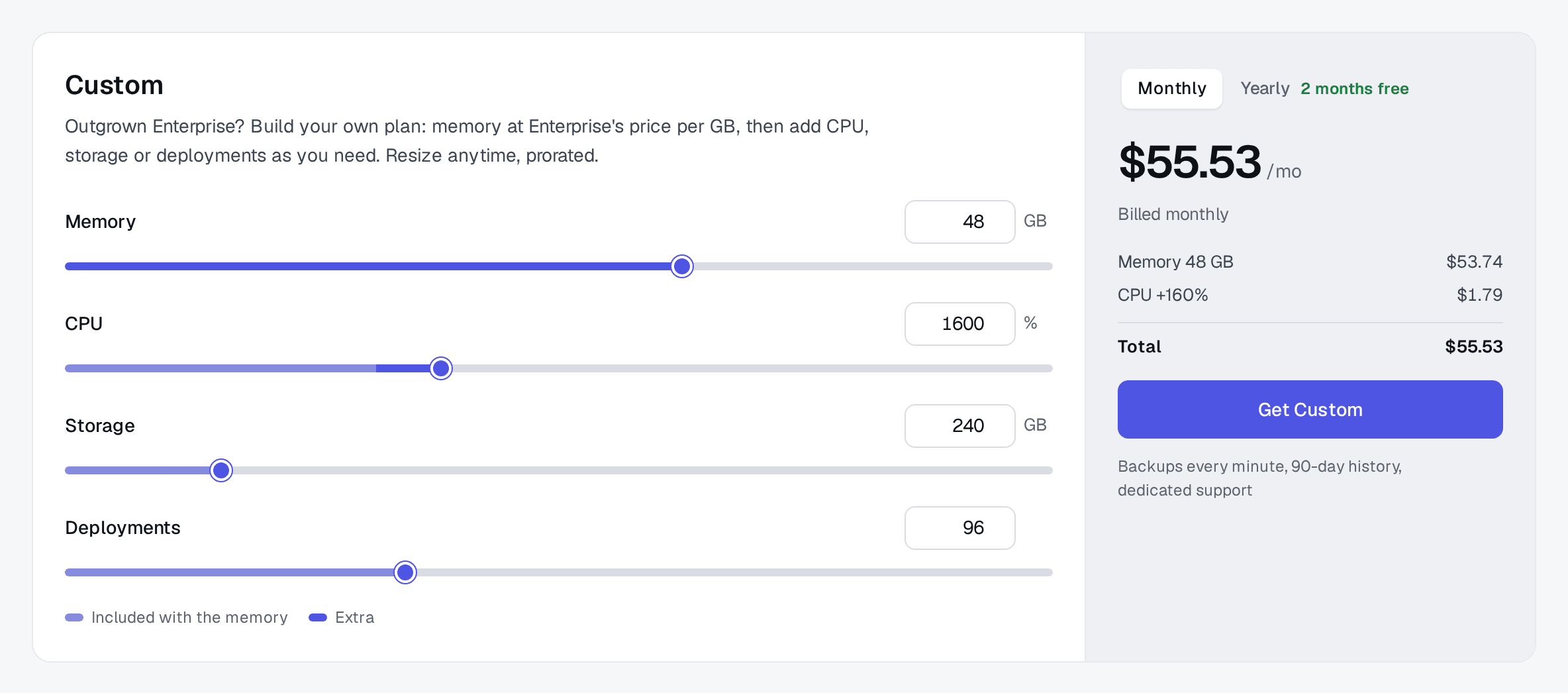
Prices are the ones the pricing page shows for your region, before VAT. Custom starts where Enterprise stops: from 21 GB, each GB at Enterprise’s full price. You pick the memory, and CPU, storage and deployments follow, each adjustable above what the memory includes. A Custom plan with 48 GB costs $53.74 a month and includes 1,440% CPU, 240 GB of storage and 96 deployments (the screenshot below adds 160% CPU on top). Custom costs the same in every region. It is prorated, so you can resize it as the bot grows.
What else matters at this size:
- Crashes restart on their own. A crashed deployment is started again automatically. If it crashes a second time within a minute, it stays stopped instead of looping; a console open at that moment prints the exit code and whether it ran out of memory.
- Databases get consistent exports. On top of the file backups, PostgreSQL, MySQL and MongoDB deployments get a consistent export at most every 15 minutes, up to 10 GB uncompressed. Above that only the raw files are backed up, so a large database needs your own scheduled dumps too. How backups work has the details.
- A server going down is not the end. On paid plans, any deployment can be moved to another location from its Location tab, once an hour. If its server is unreachable, it can be moved right away, starting from its latest backup.
- One deployment runs on one server. That is why the advice in this post is to split a big process rather than stretch it: three clusters of 2 GB, moved to different servers from their Location tabs, survive a lost server better than one process of 6 GB.
Sharding a Discord bot, in three stages
Discord’s rule is simple: one gateway connection (a shard) can hold at most 2,500 servers, and a bot in 2,500 servers or more must shard (Discord docs), or Discord closes the connection with error 4011, “Sharding required”. The discord.js guide recommends planning for about 1,000 servers per shard, so you are not at the limit the day you cross it.
One process, several connections (stage 1)
Up to a few thousand servers, discord.js can open several shards in one process:
const client = new Client({ intents: [GatewayIntentBits.Guilds], shards: 'auto' });It is the easiest step, and the one you will leave first: everything shares one process, one event loop and one heap.
One deployment, one process per shard (stage 2)
discord.js’s ShardingManager starts each shard in its own child process, all inside the same deployment. Your entry file becomes the manager:
// index.js, set as the entry file in the Startup tab
const path = require('node:path');
const { ShardingManager } = require('discord.js');

const manager = new ShardingManager(path.join(__dirname, 'bot.js'), {
  token: process.env.DISCORD_TOKEN,
  totalShards: 'auto',
});
manager.on('shardCreate', (shard) => console.log(`Launched shard ${shard.id}`));
manager.spawn();
totalShards: 'auto' asks Discord for the recommended count. Shards that die are respawned by the manager, and the deployment itself is restarted if the manager dies. This carries most bots to tens of thousands of servers, as long as the deployment has the RAM.
Clusters across several deployments (stage 3)
Past that, you run the shards in several deployments, each holding a fixed slice. discord-hybrid-sharding groups shards into clusters (one process per cluster instead of one per shard, which saves memory) and lets each deployment run only its own clusters.
Say the bot is in about 45,000 servers. Fix the total at 48 shards, 4 shards per cluster, so 12 clusters, and give each of the three deployments 4 clusters:
| Deployment | BOT_FIRST_CLUSTER | BOT_LAST_CLUSTER | Shards |
|---|---|---|---|
| atlas-cluster-0 | 0 | 3 | 0 to 15 |
| atlas-cluster-1 | 4 | 7 | 16 to 31 |
| atlas-cluster-2 | 8 | 11 | 32 to 47 |
All three deployments run the same repository, with BOT_TOTAL_SHARDS=48 and BOT_SHARDS_PER_CLUSTER=4 set on each:
// cluster.js, the entry file of every cluster deployment
const { ClusterManager } = require('discord-hybrid-sharding');

const total = Number(process.env.BOT_TOTAL_SHARDS);
const perCluster = Number(process.env.BOT_SHARDS_PER_CLUSTER);
const first = Number(process.env.BOT_FIRST_CLUSTER);
const last = Number(process.env.BOT_LAST_CLUSTER);

const clusterList = Array.from({ length: last - first + 1 }, (_, i) => first + i);
const shardList = clusterList
  .flatMap((c) => Array.from({ length: perCluster }, (_, i) => c * perCluster + i))
  .filter((id) => id < total);

const manager = new ClusterManager(`${__dirname}/bot.js`, {
  totalShards: total,
  shardsPerClusters: perCluster,
  shardList,
  clusterList,
  mode: 'process',
  token: process.env.DISCORD_TOKEN,
});
manager.on('clusterCreate', (cluster) => console.log(`Launched cluster ${cluster.id}`));
manager.spawn({ timeout: -1 });
// bot.js
const { ClusterClient, getInfo } = require('discord-hybrid-sharding');
const { Client, Events, GatewayIntentBits } = require('discord.js');
const client = new Client({
intents: [GatewayIntentBits.Guilds],
shards: getInfo().SHARD_LIST,
shardCount: getInfo().TOTAL_SHARDS,
});
client.cluster = new ClusterClient(client);
client.once(Events.ClientReady, () => client.cluster.triggerReady()); // required since 3.0
client.login(process.env.DISCORD_TOKEN);Two details from the library: since version 3.0 each cluster must call triggerReady(), and the manager overwrites variables named TOTAL_SHARDS, SHARD_LIST, CLUSTER and CLUSTER_COUNT, hence the BOT_ prefix on yours.
With discord.py, the same split is two arguments of AutoShardedBot, with BOT_FIRST_SHARD and BOT_LAST_SHARD set to 0 and 15, 16 and 31, then 32 and 47 on the three deployments:
import os
import discord
from discord.ext import commands

first, last = int(os.environ["BOT_FIRST_SHARD"]), int(os.environ["BOT_LAST_SHARD"])

bot = commands.AutoShardedBot(
    command_prefix=commands.when_mentioned,
    intents=discord.Intents.default(),
    shard_count=int(os.environ["BOT_TOTAL_SHARDS"]),
    shard_ids=list(range(first, last + 1)),
)
bot.run(os.environ["DISCORD_TOKEN"])
Starting and restarting clusters without trouble
Discord limits how fast shards can connect, and the deployments do not coordinate with each other, so a few habits matter:
- Start the deployments one after the other. Most bots may identify one shard every 5 seconds (
max_concurrencyof 1 in GET /gateway/bot), so 48 shards need at least four minutes to connect. Startatlas-cluster-1onceatlas-cluster-0is up; if two deployments identify at the same moment, Discord answers with an invalid session and they retry. - Watch the daily budget. A bot gets 1,000 identifies per 24 hours across all shards, and hitting the limit makes Discord reset the bot’s token. Bot-Hosting stops a deployment that crashes twice within a minute, but inside it the manager respawns its own shards: discord-hybrid-sharding caps that with its
restartsoption (three per hour by default),ShardingManagerdoes not, so keep an eye on a shard that keeps dying. - Restart one deployment at a time. To ship a new version, push to the branch and restart the clusters one by one with Auto-pull at restart on. Only a third of your servers see the bot reconnect at any moment.
- DMs arrive on shard 0. Events without a server, such as direct messages, are only sent to shard 0, so
atlas-cluster-0handles all of them. - Cross-cluster numbers need a shared store.
broadcastEvalandfetchClientValuesonly reach the clusters of the same deployment. For a global server count, have each cluster write its own count to Redis every minute and add them up when you need the total.
When a bot gets close to 150,000 servers, Discord moves it to large bot sharding by itself, tells you which multiple your shard count must follow, and raises its identify limits. Nothing to request in advance.
Shared state belongs in Redis and PostgreSQL
A SQLite file lives in the volume of one deployment. As soon as the bot runs in several deployments, that file stops being the truth: each cluster would see its own copy. Move it out:
- PostgreSQL (or MySQL, or MongoDB) for durable data: settings per server, user profiles, economy balances. One database deployment, used by every cluster through
DATABASE_URL. - Redis for everything short-lived and shared: caches, cooldowns, rate limits, cross-cluster counters, and the job queue described below.
Both are database deployments in the same project, with their host, port, credentials and connection string in their Database tab. There is no private network between deployments: clusters reach the database through its server’s address and published port, protected by the generated password. Two consequences:
- Keep Redis close to the clusters that call it on every event. Same location, ideally. Spreading clusters across locations trades a little latency for resilience; the database is where that latency adds up.
- Moving a database changes its address. If you move the Redis or PostgreSQL deployment to another location, update
REDIS_URLandDATABASE_URLon every cluster.
And give the database enough RAM for its working set: a PostgreSQL deployment starved of memory slows down every cluster at once.
APIs, websites and workers
The same pattern applies outside Discord. A domain points to one deployment, so a website or API scales in two directions:
- Up: give the deployment more RAM and CPU, and run several processes inside it, with Node’s
clustermodule, PM2, or Gunicorn and Uvicorn workers in Python. Set the number of processes from the deployment’s CPU allocation (200% means two), not from the machine’s core count, which is whatos.availableParallelism()andpm2 start -i maxreport inside a container. - Out, through workers: move anything slow out of the request (sending emails, generating images, calling an AI model, crawling) into a queue in Redis, with BullMQ for Node.js or RQ, Celery or arq for Python. Worker deployments take jobs from the queue. When the queue grows, add another worker deployment running the same code.
A Telegram bot with a large audience follows the same logic: switch it from polling to webhooks on the HTTPS address its Domains tab gives it, answer quickly, and let workers do the heavy part.
Cut memory before buying more
At scale, a Discord bot’s memory goes mostly into its caches. Before raising the RAM, check what you cache. Every intent you do not request is events you never receive and objects you never store. Then limit the caches you do not need, and sweep the rest:
const { Client, GatewayIntentBits, Options } = require('discord.js');

const client = new Client({
  intents: [GatewayIntentBits.Guilds],
  makeCache: Options.cacheWithLimits({
    ...Options.DefaultMakeCacheSettings,
    ReactionManager: 0,
    GuildMemberManager: {
      maxSize: 200,
      keepOverLimit: (member) => member.id === member.client.user.id,
    },
  }),
  sweepers: {
    ...Options.DefaultSweeperSettings,
    messages: { interval: 3_600, lifetime: 1_800 },
  },
});
Leave the guild, channel, role and permission overwrite caches alone: discord.js states that customising them is unsupported and breaks things. Then watch the live RAM of each cluster in its overview. Discord and the libraries publish no figure for memory per server, because it depends entirely on your intents and caches, so measure yours. If a cluster still needs more, resize it from the pool; it restarts to apply the new limit.
Questions about large deployments
When do I need to shard? Discord requires it from 2,500 servers. The discord.js guide suggests about 1,000 servers per shard and preparing around 2,000, so switching is a planned change rather than an outage.
How much RAM will my bot need? There is no reliable rule per server: two bots of the same size can differ by ten times depending on intents and caches. Measure a cluster under real traffic, then size the others from it.
Can my clusters run in different locations? Yes, on paid plans. Each deployment can be moved to another server or location from its Location tab. Spread the clusters out and a lost server only takes the clusters it was running; keep Redis and the database near the clusters that query them most.
What if I need more than 64 GB or 200 deployments? Contact us with what you run. Above the Custom range, we look at it case by case.
Move the big one over
Start with the piece that hurts most, often the database or the bot itself, in a new project on your Bot-Hosting account, and build the Custom plan that fits on the pricing page. For the design side of a growing bot, Building a Discord bot that scales covers data storage and code structure. If you host apps for clients as well, the guide for freelancers and agencies covers projects, sharing and access rights.