

You build things for other people: a Discord bot for a gaming community, a Telegram bot for a shop, the web dashboard that goes with it, a small API, a landing page. With two or three clients, a cheap VPS each is fine. With ten, you are quietly running a hosting company on the side: ten servers to patch, monitor and pay for, or one server for everybody, where a memory leak in one client’s bot takes the other nine offline and every key sits in the same folder. And when a client asks “is it down?”, you are the only person who can check.
This guide sets up Bot-Hosting as the back office for that work. One account, one project per client, every app in its own container with its own limits, and clients who can check on their own app without touching anything else.
The setup in three steps
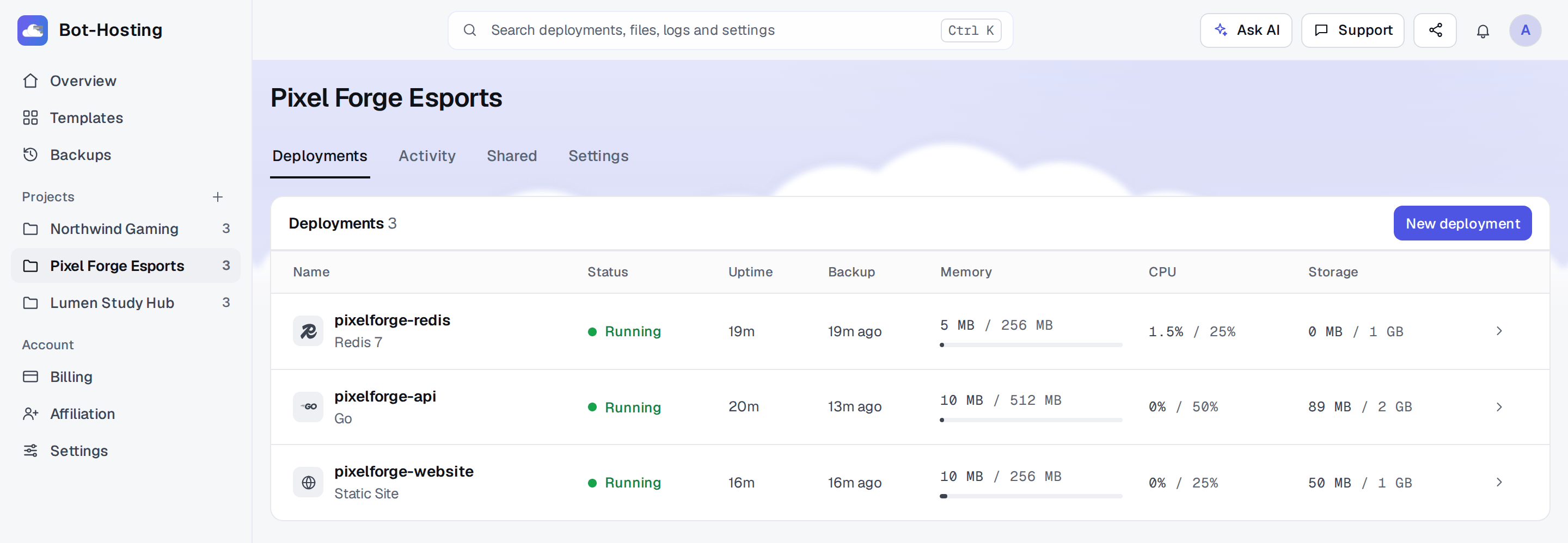
- Create one project per client. Click the + next to Projects in the sidebar. Projects are folders for deployments; name them after the client: Northwind Gaming, Pixel Forge Esports.
- Add one deployment per app. In the client’s project, click New deployment for each piece: the Discord bot, the website, the API, the worker, the database. Code comes from GitHub (private repositories work once you connect your GitHub account), a zip, or your editor. Then open the Environment tab and add the client’s keys, such as
DISCORD_TOKEN, as Secret variables. - Share it with the client. In the deployment’s Settings tab, open Sharing, click Share, type the email of the client’s Bot-Hosting account and tick Overview plus anything else they may do. Overview alone lets them see whether the app is online and follow its live console, read only, without your code or their keys.
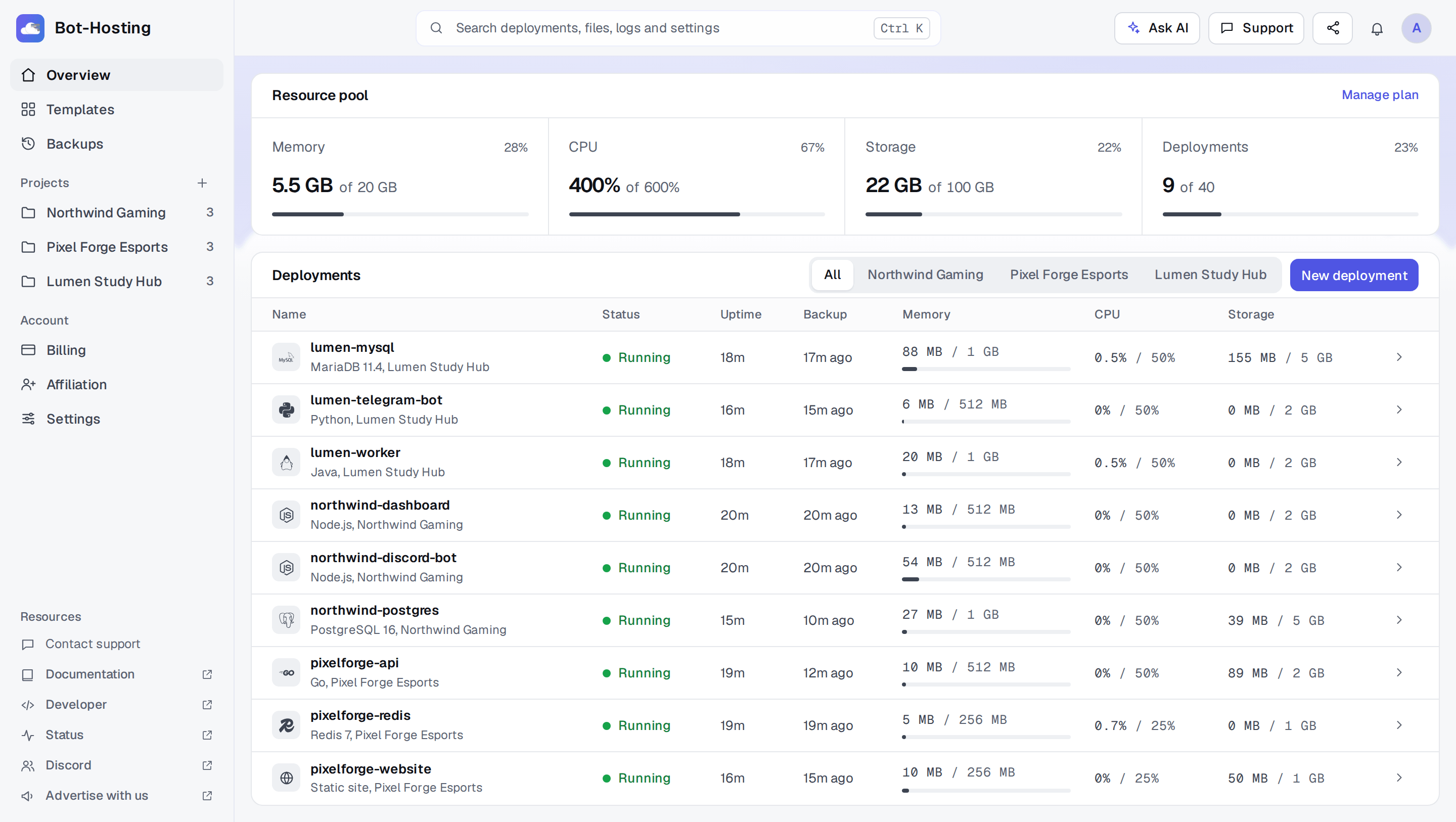
That is the whole structure, and it scales: on 9 November 2026, the largest project on Bot-Hosting held 53 Node.js deployments on its own. The rest of this post explains why it holds up at twenty clients, what it costs, and how to automate the repetitive parts.
One account for the whole client stack
The same account runs everything a client project is usually made of:
- Bots: Discord, Telegram, Slack, or anything else that runs as a long-lived process.
- Websites and dashboards: Node.js, Python, PHP or Bun apps, or a static site, served over HTTPS on a free subdomain or on the client’s own domain.
- APIs and workers: an Express or FastAPI backend, a queue worker, a scheduled job.
- Databases: PostgreSQL, MySQL (MariaDB), MongoDB and Redis, as deployments next to the app that uses them.
- Runtimes: Node.js, Bun, Python, Java, Go, Rust, C++, PHP and Lua, plus ready-made services such as Lavalink and Uptime Kuma.
So the client who started with “just a bot” and now wants a dashboard and a database stays in the same project, on the same bill.
Why one container per app matters
On a shared VPS, your clients’ apps are processes on the same machine. On Bot-Hosting, each deployment is its own container:
- Its own memory and CPU limit. An app with a leak hits its own ceiling and restarts. The apps of your other clients keep the memory and CPU they were given.
- Automatic restart after a crash. If a process crashes, it is started again on its own. If it crashes again within a minute, it is left stopped so it does not loop forever. A console open at that moment prints the exit code and whether it ran out of memory.
- Its own secrets. Each deployment has its own environment variables. A secret variable shows as dots in the dashboard and is always masked in the API.
- Its own backups. Files are backed up per deployment, so restoring one client’s app to yesterday never touches another client.
The same Git repository can feed as many deployments as you want. If you sell the same bot or site to several clients, deploy the repository once per client and give each deployment its own variables (token, branding, channel IDs). Fix a bug, push, and each deployment picks it up at its next restart from the panel when Auto-pull at restart is on, or right away with Pull now in the deployment’s GitHub tab. The GitHub deployment guide covers that flow step by step.
What it costs at 8, 12, 25 or 40 apps
Paid plans give you a pool: a number of slots (one slot is one deployment) and an amount of RAM, CPU and storage that you split between them as you like. A small moderation bot can run on 256 MB while a client’s Next.js dashboard gets 1 GB, from the same pool.
| Plan | Slots | RAM | CPU | Per month | One app and one database each |
|---|---|---|---|---|---|
| Advanced | 8 | 4 GB | 200% | $6.19 | 4 clients |
| Pro | 12 | 8 GB | 250% | $8.99 | 6 clients |
| Pro+ | 25 | 14 GB | 400% | $13.49 | 12 clients |
| Enterprise | 40 | 20 GB | 600% | $22.39 | 20 clients |
| Custom | 42 to 200 | 21 to 64 GB | up to 3,200% | from $23.51 | 100 clients for $83.96 |
Prices are the ones the pricing page shows for your region: monthly, before VAT, and a year costs ten months. 100% CPU is one full core. Custom starts where Enterprise stops: from 21 GB, each GB at Enterprise’s full price, plus any extra CPU, storage or slots you add.
A database is a deployment, so it uses a slot. On Pro+, twelve clients with an app and a PostgreSQL database each use 24 of the 25 slots and cost you about $1.12 per client per month. Split evenly, each of those 24 deployments gets about 600 MB of RAM and a sixth of a core, and nothing forces an even split. Every deployment needs at least 256 MB of RAM, 15% CPU and 512 MB of storage, so a pool cannot be cut into smaller pieces than that. The 100-client Custom line is exactly that floor: 200 deployments of 256 MB and 15% CPU each.
From Pro upwards, backups check for changes every minute and keep 30 days of history (60 on Pro+, 90 on Enterprise and Custom). MySQL, PostgreSQL and MongoDB deployments also get a consistent export (mysqldump, pg_dumpall, mongodump) at most every 15 minutes. How backups work has the details.
How much access to give a client
Sharing works with the client’s own Bot-Hosting account. The client does not need a paid plan: what you share runs on your plan and counts against your slots. A free account is enough for them to sign in. Removing someone takes effect at once; a console they already had open can keep streaming for a few minutes.
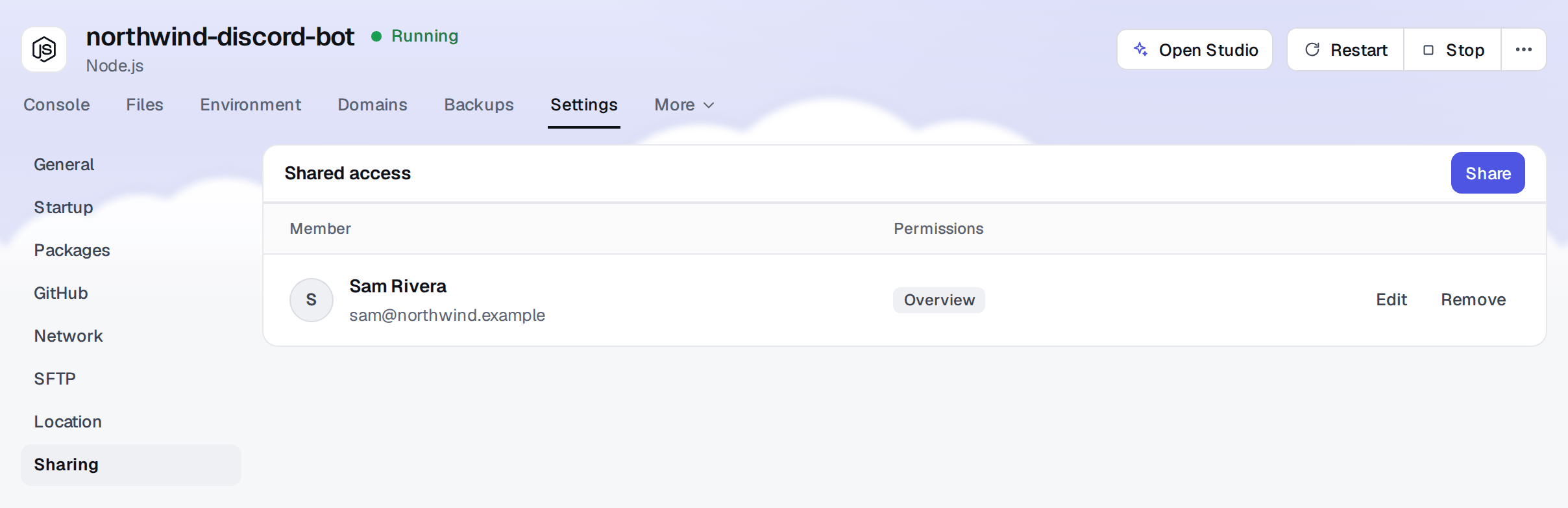
These are the permissions on a deployment:
| Permission | What the client can do |
|---|---|
| Overview | See the deployment, its status and the live console, read only |
| Manage | Start, stop and restart it, use the console and the shell, change the startup command, see a database’s credentials |
| Environments | Read and edit environment variables, including keys and tokens |
| Files | Browse and edit the code, and use the GitHub, Packages and SFTP tabs |
| Databases | Browse and edit the data in the database manager |
| Backups | Browse and restore backups |
| Network | Change ports and domains |
| Administrator | Everything above |
Always tick Overview: without it the deployment does not open, whatever else is ticked. On its own, Overview is the right default for a client who pays you to run the app: they can answer “is it online?” and “what does the error say?” on their own, and send you a screenshot of the console instead of a vague message. Be careful with Manage: the shell and the startup command run inside the container, where the code and the environment live. Give it to a client who owns the code anyway, or to a developer on their side, not to someone who should never see the token.
A project also has a Members list in its Shared tab, with Overview (needed to open the project page), Deployments, Activity logs and Settings permissions. It does not reach the deployments inside: share each one too.
What clients ask for next
The follow-up requests are where a bot-only host stops and this setup keeps going:
- “Can it be on our domain?” Give the website, dashboard or API the client’s domain in the Domains tab, such as
app.your-client.com. You add a CNAME at their DNS provider (an A record plus a TXT record for a root domain), and it is served over HTTPS. - “Can you bring back yesterday’s data?” Restore the deployment from the Backups tab, without touching any other client.
- “It feels slow since we grew.” Change the deployment’s RAM and CPU from your pool; it restarts to apply the new limits. When one process is no longer enough, the guide to large bots and apps shows how to split it into shards, workers and a shared cache.
Automate the repetitive parts
Deployments, environment variables, files, backups and domains are all in the API, with keys created under Account > Developer (sharing and billing stay in the dashboard). A key with only the deployments:read scope is enough for a morning check of every client app:
// check.mjs, run with: BH_API_KEY=bhk_... node check.mjs
const res = await fetch('https://bot-hosting.net/api/v1/deployments', {
  headers: { Authorization: `Bearer ${process.env.BH_API_KEY}` },
});
if (!res.ok) throw new Error(await res.text());
const { deployments } = await res.json();

for (const d of deployments.filter((d) => d.owned)) {
  console.log(d.state.padEnd(10), d.name);
}
state comes from the servers themselves, at most 15 seconds old, not from a stored status: running, starting, stopping, offline, installing, or unknown when a server did not answer. Add the deployments:write, env:write and deployments:power scopes and the same API creates deployments, sets environment variables and restarts apps, which turns onboarding a new client into a script.
If you work with an AI agent, connect it once from the AI agents page and ask in plain words: “restart every Northwind deployment and show me the last errors of the dashboard”. For day-to-day coding, the Bot-Hosting CLI pushes each save from your editor to the right deployment.
A week with twelve clients
Here is what a week could look like with this setup, for a freelancer with twelve clients on Pro+: eight Discord bots with a PostgreSQL each, two Telegram bots with a Redis each, and two dashboards with a MySQL each. 24 deployments, 24 of the 25 slots.
- Monday, 9:00. The check script prints 24 lines. One says
offline: a Telegram bot crashed twice within a minute and was left stopped. You click Start with its console open and watch it die again withOut of memory: true. You move 256 MB from a quiet moderation bot to it (that one restarts on its own) and start the Telegram bot again, done before coffee. - Tuesday. A client writes “/rank does not answer”. They have Overview, so the message comes with a screenshot of the console and the actual error. You fix it in the repository that five of your clients run, push, and click Pull now on those five deployments.
- Thursday. Someone on a client’s team deleted half of their bot’s config file. You restore that one deployment from the Backups tab to the state of the morning. The other eleven clients never notice.
- Friday. A new client signs. You create their project, deploy the bot from your repository into your 25th and last slot (256 MB, 15% CPU and 512 MB of storage taken from quiet bots), paste their token in Environment, and share it with the email of their Bot-Hosting account. Ten minutes, and they can watch it start.
- End of the month. One invoice of $13.49, plus VAT where it applies, for the whole portfolio, and you bill each client your own way.
Nothing in that week needs SSH, a server to patch, or a second account.
Questions freelancers ask
Who pays, me or my client? You do. Deployments run on the plan of the account that owns them, and you bill your client however you like. At checkout you can add your company’s VAT number, and the invoices are in Billing for your accounting.
Can I hand a project over to my client’s own account? There is no ownership transfer between accounts. When a client wants to take a project over, they create their own account and plan, deploy from the same Git repository, and you move the rest: files over SFTP, data with a database export. The old deployments can then be deleted from yours.
What happens if one client’s app misbehaves? It stays inside its own limits. It can use all of its RAM and CPU, crash and restart, while the other deployments keep theirs.
What if I outgrow 40 slots? The Custom plan, below the comparison table on the pricing page, goes up to 200 deployments and 64 GB of RAM, with CPU and storage adjustable separately. It is prorated, so you can resize it as you sign new clients.
Start with your next client
Create your Bot-Hosting account, make a project for the client you are working on, and move their bot or site in. When the second client comes along, the structure is already there. Plans and the Custom configurator are on the pricing page.