

Your bot ran on Replit for free. A small web server sat next to it, an uptime monitor pinged that server every five minutes, and the bot stayed online. Then it started going offline, and no amount of pinging brings it back. Nothing is wrong with your code: Replit changed what it hosts for free.
This post explains what changed, what a Discord bot that runs 24/7 costs on Replit today, how three alternatives compare, and how to move your bot in about ten minutes. Every figure about Replit, Railway and Render comes from their own pricing pages and documentation, checked on 24 November 2026. The links are at the end.
What changed on Replit
Three things, in this order:
- Always On is gone. Replit retired Always On at the start of 2024 and made Deployments, now called publishing, the only way to host an app. Since the same change, a project’s development URL only answers while the editor is open, so an uptime monitor has nothing left to ping.
- The free plan publishes one app, for 30 days. Replit’s Starter plan includes one free published app, and its documentation says that the published link goes down automatically after 30 days.
- The default deployment type sleeps. Autoscale, the type Replit recommends for most apps, scales to zero when idle and goes idle after 15 minutes of inactivity. That suits a website, which wakes up when a visitor arrives. A Discord bot never receives a visitor.
For a bot, Replit’s documentation points to another type, the Reserved VM: a machine that never sleeps, listed for bots, background work and always-on APIs. Its own example of a Reserved VM is a Discord bot.
What a 24/7 bot costs on Replit in 2026
| Replit | |
|---|---|
| Free plan | 1 published app, its link goes down after 30 days |
| Deployment type for a bot | Reserved VM |
| Smallest Reserved VM on the price list | 0.5 vCPU and 2 GB of RAM, $15 a month |
| Plan with unlimited published apps | Core, $20 a month, or $18 a month billed annually |
Publishing costs are deducted from the monthly credits of your plan first, and you pay usage-based fees once those credits are used up. Either way, a bot that used to cost nothing now sits on a paid plan.
That is a fair price for what Replit sells: an editor in the browser, an AI agent that writes the code, and 2 GB of RAM for the bot. It is a lot if all you wanted was a place where a 100 MB process keeps running.
When Replit is still the right choice
- You build in the browser with Replit’s agent and want the code, the AI and the hosting in one tab.
- You already pay for Core for other projects, and the bot fits in the credits you have.
- You work on the bot with other people in real time, in a class or a team.
If none of that applies and you only need the bot online, a host built for long-running processes costs less.
What to look for in an alternative
A Discord bot is a process that holds one outgoing WebSocket connection to Discord for days. It needs four things from a host:
- No sleep timer tied to HTTP traffic. The bot never receives a request, so a host that sleeps idle web apps puts it to sleep.
- A restart after a crash, without you noticing first.
- A safe place for the token, outside the code.
- Files that survive a restart, if the bot keeps a SQLite database or a JSON file.
Three alternatives compared
| Railway | Render | Bot-Hosting | |
|---|---|---|---|
| Free option | $1 of usage a month, after a 30-day trial with $5 | Free web services only | Free plan with 256 MB of RAM |
| Stays online without HTTP traffic | Yes, while the credit lasts | No, it spins down after 15 minutes | Yes |
| What ends the free ride | The $1 runs out: it covers about 100 MB of RAM around the clock | Background workers have no free plan | A missed renewal click, every 4 days |
| Cheapest always-on plan | $5 a month, including $5 of usage | $7 a month for 0.5 CPU and 512 MB | $2.29 a month for 1 GB of RAM |
Railway and Render list their prices in US dollars. The Bot-Hosting price is the one the pricing page shows for your region, before VAT. The Railway vs Render vs Bot-Hosting comparison goes through each of them in detail, with the arithmetic.
Move your bot from Replit in ten minutes
1. Get the code out
Download the project as a zip from Replit’s file menu, or push it to a GitHub repository from Replit’s Git pane. GitHub is the better option: you keep editing wherever you like, and the host pulls the latest commit.
2. Copy your secrets
Open the Secrets tool in Replit and note every key and value, starting with the bot token. They do not travel with the code, which is the point of a secret.
3. Delete the keep-alive server
If you followed the old tutorials, your project has a file like this one:
# keep_alive.py
from flask import Flask
from threading import Thread

app = Flask('')

@app.route('/')
def home():
    return "I'm alive"

def run():
    app.run(host='0.0.0.0', port=8080)

def keep_alive():
    Thread(target=run).start()
Delete the file, and remove the keep_alive() call and its import from your main file. In a Node.js project, the same thing is usually an Express app whose only route answers the ping. A host that does not sleep the process has no use for it, and the web server costs memory.
4. Declare your dependencies
Replit installs many packages for you as you import them. Elsewhere, the list has to be in the repository: a package.json for Node.js, a requirements.txt for Python. For a discord.py bot, one line is often enough:
discord.py5. Replace Replit DB, if you used it
The replit Python package and @replit/database talk to a key-value store that only exists inside Replit. Outside, they have nothing to connect to. For a small bot, a SQLite file or a JSON file next to the code does the same job, and it stays on the deployment’s storage between restarts. For more, add a PostgreSQL, MySQL, MongoDB or Redis database.
6. Create the deployment
Sign in to Bot-Hosting.net with Discord and start a new deployment:
- What are you deploying? Choose Application, then Node.js or Python.
- Source: pick GitHub and paste the repository URL, or Archive and drop the zip.
- Click Launch deployment. The entry file defaults to
index.jsfor Node.js andmain.pyfor Python; change Entry file in the Startup tab if yours has another name.
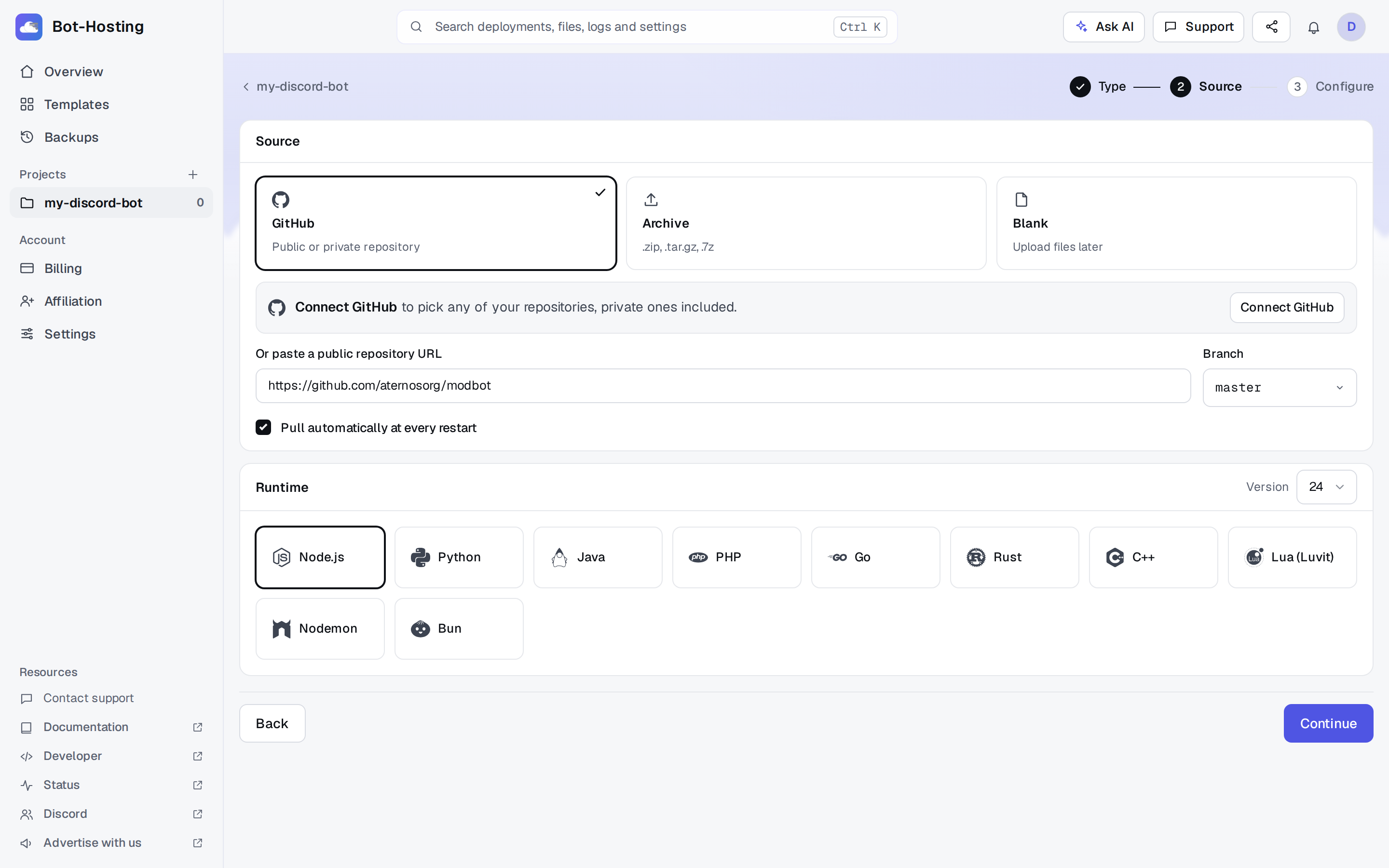
On every start, the deployment runs npm install when it finds a package.json, or pip install -r requirements.txt for Python. The GitHub deployment guide covers private repositories and automatic pulls.
7. Add the token
Open the Environment tab, click Add variable, name it the way your code reads it, DISCORD_TOKEN for example, paste the value and tick Secret. Saving restarts the deployment. The Console then shows the install and your bot’s own startup line.
Your code reads the variable exactly as it did on Replit: process.env.DISCORD_TOKEN in Node.js, os.environ["DISCORD_TOKEN"] in Python.
The limits of the free plan
So that nothing surprises you later:
- 256 MB of RAM, 25% of a CPU core, 512 MB of storage and one deployment. That runs a discord.js or discord.py bot in a few dozen servers. A music bot or a bot that caches every member of large servers needs more.
- A renewal click every 4 days. The plan stays free, and the click only proves that someone still uses the bot. If you miss it, the deployment is suspended until you renew, and deleted if you do not renew within 3 days.
- No card and no trial end. There is nothing to cancel.
Paid plans renew on their own. Starter costs $2.29 a month for 1 GB of RAM, 50% of a core, 5 GB of storage and two deployments. Starter+ costs $3.39 for 2 GB of RAM, a full core and four deployments.
FAQ
Does the UptimeRobot trick still work on Replit?
No. The trick kept a free project awake by sending it an HTTP request every few minutes. Since Replit made Deployments the only hosting option, the development URL only answers while the editor is open, so a monitor cannot wake the bot.
Can I keep writing my code on Replit and host the bot elsewhere?
Yes. Push to GitHub from Replit, and turn on Auto-pull at restart in the deployment’s GitHub tab. Each restart fetches the latest commit before the bot starts.
Is 256 MB enough for my bot?
For a bot with slash commands in a few dozen servers, yes. If the console shows that the process was killed for using too much memory, trim the caches or move to a plan with more RAM.
My bot is in Python, does the same apply?
Yes. The discord.py hosting guide follows the same steps with a Python example, and the discord.js guide does it for Node.js.
Sources
Checked on 24 November 2026:
- Replit: Changes to Hosting on Replit, pricing, Starter plan, publishing and deployment pricing.
- Railway: pricing and plans.
- Render: free instances and pricing.
Prices and limits change. If one of these figures is out of date, the provider’s own page is the reference.